


Trust doesn’t grow from more messages alone. Communication skills for remote workers start with clear expectations, thoughtful written updates, and meeting habits that give everyone a genuine chance to participate. Small, steady signs of attention and follow-through help a team feel connected, even when people aren’t sharing a room.
Remote communication can feel awkward. A brief message may sound sharper than intended, or someone joining a hybrid meeting by video may feel left out. You don’t need to be constantly available or perfectly polished. A few intentional habits can make everyday exchanges easier and more human.
Here are practical ways to include remote employees in hybrid meetings, build team connection, write clearly, and handle tricky moments with care. Learn when to send a quick message or start a conversation, how to listen well on video calls, and how to keep collaboration moving across different schedules. The goal is simple: help people feel informed, heard, and able to trust one another.
Key Takeaways
- Make hybrid meetings easier to join by creating space for remote colleagues to speak and keeping shared context visible to everyone.
- Use low-pressure virtual activities and everyday moments of small talk to help coworkers build warmer connections.
- Shape written messages around their purpose, choosing clear wording and a suitable channel when tone could be misunderstood.
- Balance the ease of flexible, asynchronous work with thoughtful check-ins, reliable follow-through, and healthy communication boundaries.
1. Keeping remote employees included in hybrid meetings
Hybrid meetings work better when remote employees can follow the discussion and join in. The University of Oregon recommends giving remote staff a genuine opportunity to participate. Invite online attendees to speak before moving to the next topic, and pause if someone is interrupted. Avoid side conversations in the room, where remote participants may not hear them. Encourage cameras when practical, since faces and gestures can help colleagues read the group.
Set meeting norms before the call. Share an agenda that states the goal, discussion points, and decisions needed, so employees can prepare and the group can stay focused. Agree on how people signal they want to speak, where notes are saved, and whether important calls will be recorded for absent members. Weekly video meetings can help teams notice tone and expressions; shorter check-ins can share progress without turning every update into a long discussion.
Active listening shows up in simple, visible actions. Look toward the webcam, nod, and avoid multitasking while a colleague speaks. Check your understanding by restating the key point: “So the launch date depends on the final design review.” Speak clearly on calls. For phone meetings without screen sharing, email referenced reports or presentations beforehand, then name the relevant page or section during the discussion.
Remote workers can give and receive feedback effectively by describing a specific action, its effect, and a next step. For example: “The written summary clarified the handoff. Could you include the deadline next time?” When receiving feedback, listen without interrupting, restate the request, and ask a focused question if the expected change isn’t clear.
To avoid misunderstandings across time zones and cultures, put deadlines and responsibilities in writing, and choose meeting times that respect colleagues’ work boundaries. Record decisions in shared channels, explain unfamiliar shorthand, and allow for different communication styles. These habits make remote work more predictable and help create a culture where everyone can contribute.
2. Using virtual activities to build team connection
Remote team relationships grow through small, repeated opportunities to get to know one another beyond task updates. The University of Oregon recommends making room for small talk at the start of virtual meetings. A brief check-in, such as sharing a weekend highlight, offers a glimpse of colleagues’ lives without demanding a polished introduction. Virtual group lunches or optional walk-and-talks can create similar moments across distance.
Keep activities easy to join and clear about expectations. Try pairing two team members for a 15-minute virtual coffee chat each week, with a simple prompt such as “What helps you focus?” For a wider gathering, set aside 30 minutes to an hour for an informal team social. Offer a choice to listen, chat, or leave early. That flexibility can help quieter members take part without making social time feel like another work assignment.
Empathy turns those moments into trust, not just calendar events. If a teammate seems unusually quiet, check in privately with an open question instead of assuming why. If a missed handoff causes friction, name the specific impact, listen to the other person’s perspective, and agree on a clear next step. Following through helps repair trust. In virtual settings, where body language is limited, patient listening and a considerate tone matter even more.
Activities work best when they support connection without competing with productivity. Ask the remote team what feels comfortable, rotate who suggests an activity, and make participation voluntary. Explain the purpose, expected length, and whether work topics are welcome. These choices show respect for different cultures and communication styles. Over time, familiar, low-pressure rituals can make it easier to ask for help, share concerns, and collaborate with colleagues who once felt distant.
3. Choosing words and conveying tone in writing
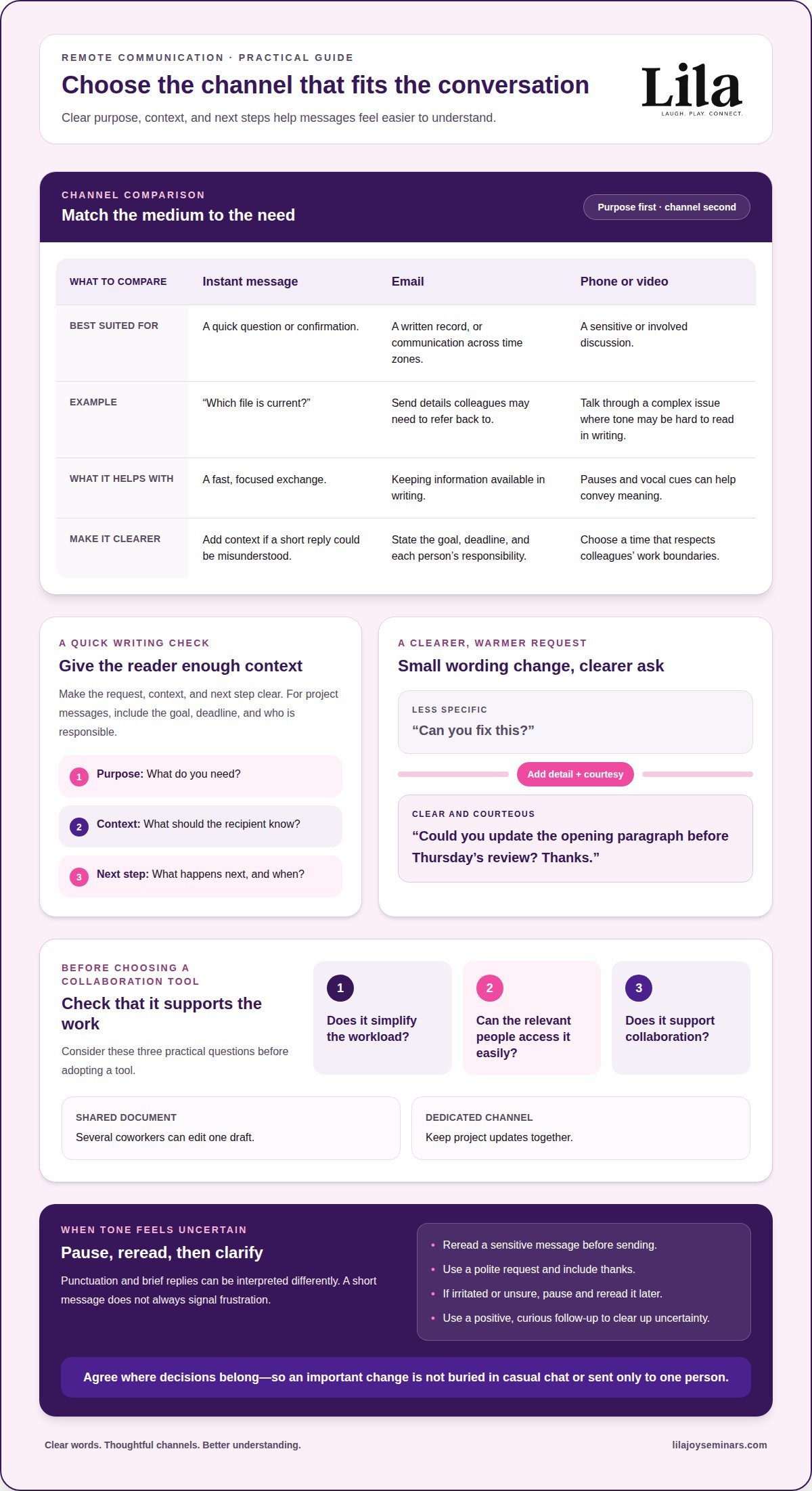
Without facial expressions or vocal cues, a short message can leave teammates guessing. Make the request, context, and next step clear. Instead of “Can you fix this?”, try “Could you update the opening paragraph before Thursday’s review? Thanks.” The recipient knows what to do, and the tone stays courteous. For effective communication, keep project messages concise and state the goal, deadline, and each person’s responsibility.
Choose a channel that fits the purpose and urgency. Use instant messaging for a quick question, such as confirming which file is current. Use email when colleagues need a written record or work across time zones. A video or phone conversation may suit a sensitive or involved discussion, where pauses and vocal cues can help convey meaning. Ask team members about their communication preferences to guide shared practices, while allowing for reasonable differences.
Before adopting a collaboration tool, consider three practical questions: does it simplify the workload, can the relevant people access it easily, and does it support collaboration? A shared document, for example, lets several coworkers edit one draft, while a dedicated channel keeps project updates together. Agree on where decisions belong, so an important change isn’t buried in a casual chat or sent only to one person.
Read a sensitive message once more before sending. Check the punctuation, make a polite request, and include thanks. “Please send the revised figures when you can. Thank you” can sound warmer than a bare command. If a message leaves you irritated or unsure, pause and reread it later. Give colleagues the benefit of the doubt: people use punctuation differently, and a brief reply doesn’t always signal frustration. A positive, curious follow-up can clear up uncertainty before a small misunderstanding becomes a conflict.
4. Benefits and challenges of remote communication
Remote communication gives people more control over when they contribute. An employee in another time zone can share a thoughtful update asynchronously instead of joining a call outside working hours. Shared channels also make project details available to the whole team, rather than leaving them in separate inboxes. These habits can reduce unnecessary meetings and help coworkers move tasks forward across different schedules.
The same flexibility can create gaps. A delayed reply may stall a handoff, while a quick message can sound abrupt without voice or facial cues. Remote workers also risk missing informal decisions or feeling pressure to stay available around the clock. The University of Oregon warns that expecting employees to be available 24/7 can create stress and eventually burnout. Clear working hours and status messages help set boundaries.
Remote workers may face misunderstandings, information silos, delayed decisions, and fewer spontaneous conversations. To prevent confusion, record the decision, owner, and next step in a shared channel after a discussion. For example, “Maya will send the revised draft by Thursday” makes the handoff clear. If a written exchange becomes tense, pause and return to it with fresh eyes, or move the discussion to a call.
Success depends on choosing communication methods that fit the work, not using every channel for every update. Share routine progress asynchronously, then meet when the team needs to solve a problem together or offer guidance. Set regular check-ins to raise blockers, and review whether current channels keep everyone informed. If people repeatedly miss decisions, change where those decisions are recorded. If messages interrupt focused work, agree on what needs an immediate response and what can wait. This balance supports relationships and keeps conversations useful without making constant availability a measure of commitment.
Make room for more natural connection
Trust between remote coworkers isn’t built in one perfect meeting. It grows through ordinary moments: a clear response, an honest question, or a willingness to listen when a conversation feels awkward. You don’t need to change your personality or fill every pause. One small choice, repeated with care, can make it easier for others to speak openly with you.
Build communication skills for remote workers through practice, not pressure. Notice which conversations feel easier, and bring that same openness to a less familiar moment. If you’d like a playful setting to explore spontaneity and connection with others, your first live online improv class with Lila is free.
Try a free class when it feels like a good next step. You can keep building trust one genuine interaction at a time.
Frequently Asked Questions
So, how do you better manage remote workers to maintain effective communication and a cohesive company?
Make communication predictable without asking people to stay online constantly. Set shared expectations for response times, work updates, decisions, and where important information lives. For example, a manager can use a project board to track ownership and ask each person to flag blockers in a regular check-in. Invite feedback about what feels unclear, then adjust team habits when the same gaps keep appearing.
What communication skills are most important for remote workers?
The most useful communication skills for remote workers include clear writing, attentive listening, dependable follow-through, and good judgment about when to speak live. After a handoff, summarize what you understood and name your next action. This gives a teammate a chance to correct any mismatch early. Curiosity matters, too: asking “What am I missing?” can open a useful conversation without assigning blame.
How can remote workers communicate clearly in writing?
Put the main point first, then add only the context the reader needs to act. A useful update might say, “The draft is ready for review. Please comment on the introduction.” Use descriptive subject lines, short paragraphs, and explicit dates or owners when they matter. Before sending a complicated note, read it as if you had no background on the project, and clarify any unexplained shorthand.
What are best practices for asynchronous communication on remote teams?
Make updates easy to understand without requiring an immediate reply. Include the decision or question, relevant background, who owns the next step, and when a response is needed. For example, add a short summary to a shared document instead of sending “Please see this” alone. Keep decisions in a team space everyone can access, and reserve urgent interruptions for matters that genuinely cannot wait.
How can remote workers run effective virtual meetings?
Strong communication skills for remote workers also include knowing when a meeting is useful and making its outcome clear. Give each call a purpose, then finish with decisions, owners, and follow-up actions. Send needed materials beforehand, and invite quieter participants to contribute through chat or a pause in the conversation. Share a brief recap afterward so absent colleagues can stay aligned.
What tools are commonly used for remote team communication, and how do they compare?
Teams commonly combine instant messaging, email, video calls, shared documents, and project boards. Messaging suits quick coordination; email keeps longer records; video helps with nuanced discussions; shared documents let people contribute together; and project boards show ownership and progress. No single tool fits every exchange. Choose tools colleagues can access easily that reduce, rather than scatter, the work of finding information.